
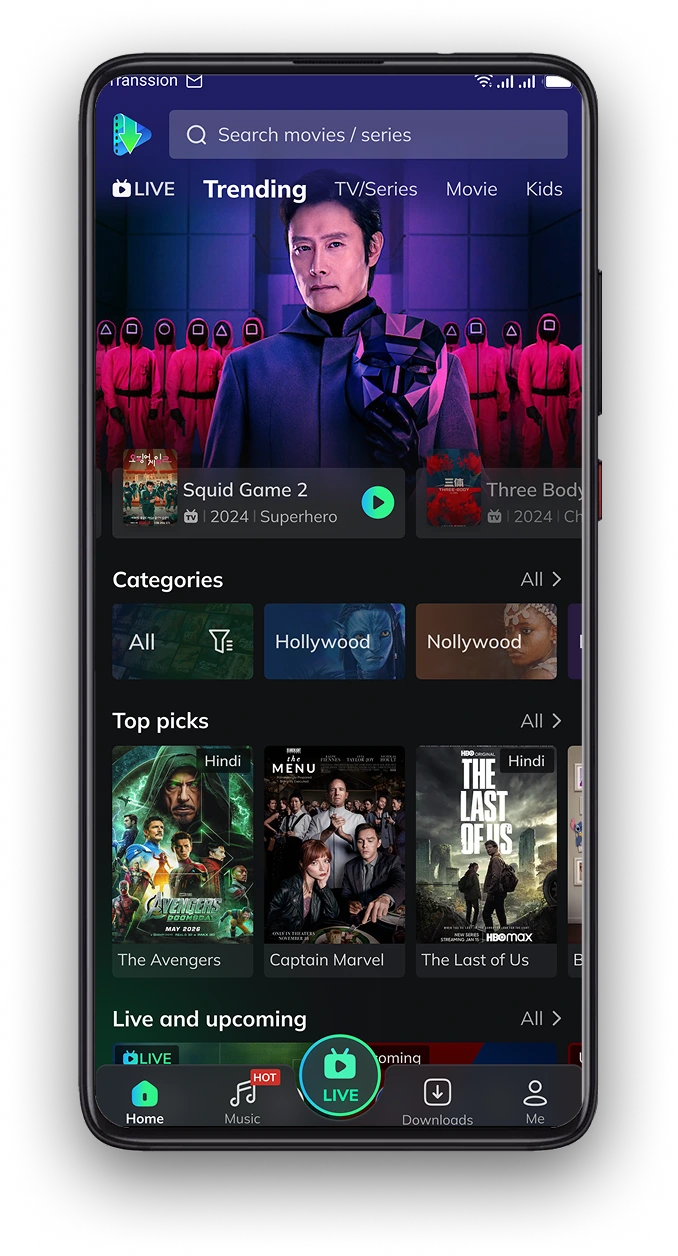
MovieBox APK is widely recognized as one of the most reliable and long-standing multimedia entertainment streaming applications available for Android smartphones, Amazon Fire TV Stick, smart TVs, and PC emulators. Engineered as an all-in-one entertainment ecosystem, MovieBox aggregates tens of thousands of on-demand blockbuster movies, international web series, trending television seasons, and high-definition live broadcasts into a clean, modern interface. By bypassing compulsory subscriptions, premium paywalls, and tedious account registrations, MovieBox delivers unrestricted cinema streaming straight to your pocket and home theater.
What is MovieBox APK?
MovieBox is an Android package file that serves as a centralized gateway to thousands of curated multimedia streams indexed across high-speed content delivery networks (CDNs). Originally famous as the pioneer of portable cinema streaming, modern MovieBox APK v11.5 utilizes advanced cloud scrapers to source crystal-clear master streams directly from verified public media hosts. Viewers can enjoy content originating from Hollywood studios, Bollywood cinema, regional Asian entertainment (Korean K-Dramas, Chinese historical sagas, Japanese Anime), and European filmmakers without paying expensive monthly recurring bills.
How Does MovieBox APK Work?
Unlike conventional streaming apps that host copyright files on vulnerable central servers, MovieBox functions through a decentralized scraping architecture. When you click on any movie title or series episode, MovieBox dynamically queries multiple verified cloud mirrors, testing latency, bitrate, and server bandwidth in real time. The app then presents users with multiple playback links categorized by resolution—from bandwidth-efficient 480p and 720p up to full 1080p FHD and 4K Ultra HD. If a particular mirror slows down, the integrated fallback engine instantly switches playback to an alternate CDN node without interrupting your movie.
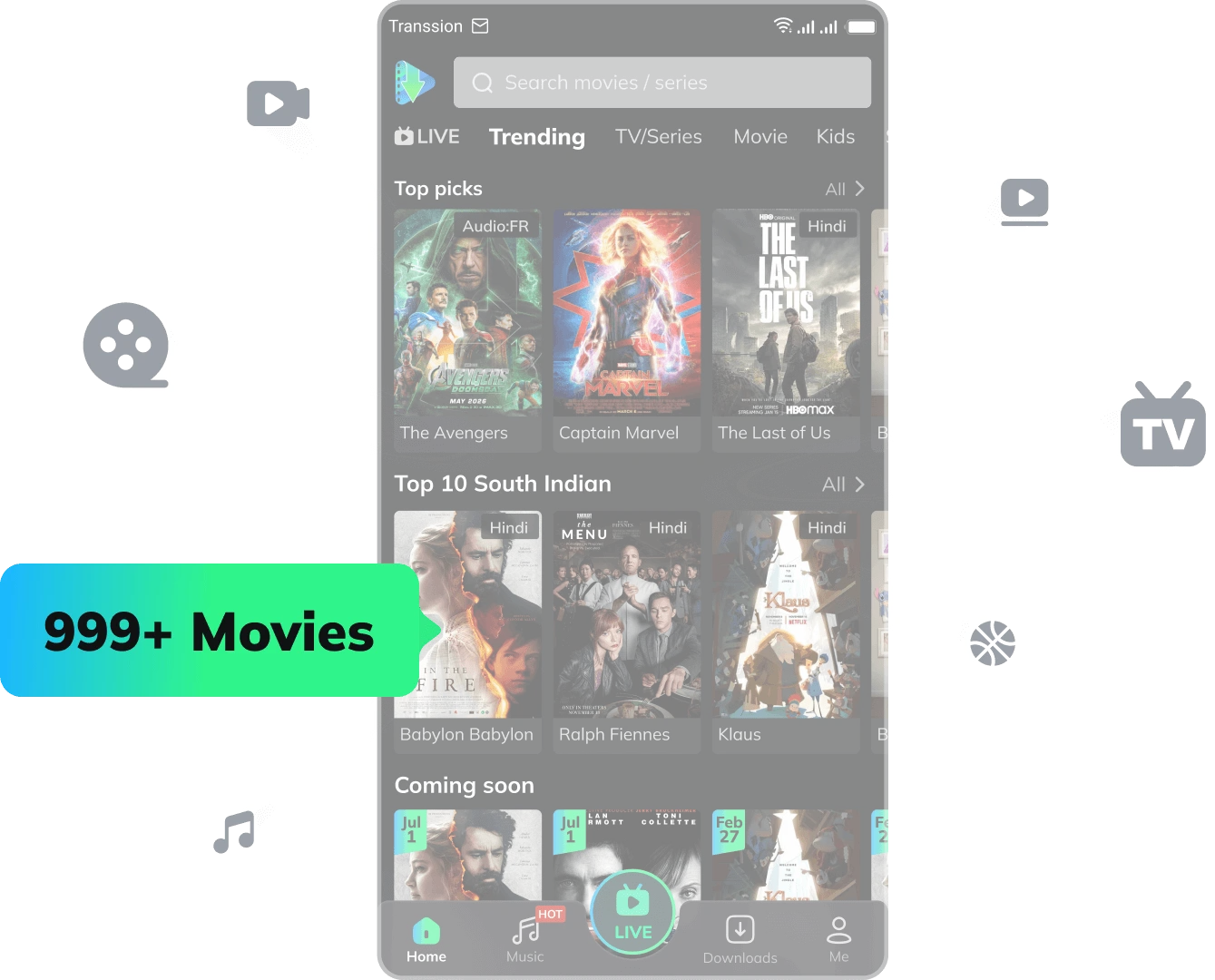
Key Highlights & Core Features of MovieBox App
The persistent popularity of MovieBox across millions of streaming fans is fueled by its feature-packed architecture, refined user interface, and resilient playback core. Below is an exhaustive overview of the standout capabilities built into MovieBox v11.5:
1. Expansive On-Demand Movie Catalogue
MovieBox contains an enormous library spanning over a century of motion picture history. From timeless golden-era classics to the newest theatrical releases and direct-to-OTT premieres, you can search across diverse genres including Action, Sci-Fi, Psychological Thriller, Romance, Comedy, Supernatural Horror, Crime, and Documentary. Every movie entry is complemented by comprehensive metadata, including IMDb ratings, release date, runtime, director, cast list, and official trailers.
2. Complete Web Series & TV Seasons
Binge-watching your favourite television sagas is effortless with MovieBox. The app arranges multi-season shows in chronological sequence with auto-play triggers, episode synopses, and resume-playback memory. Whether following intricate fantasy sagas, intense crime procedurals, or romantic international dramas, your progress is saved locally so you can resume exactly where you paused.
3. 4K Ultra HD & Adaptive Bitrate Streaming
Equipped with state-of-the-art H.265 (HEVC) hardware decoding, MovieBox streams ultra-crisp 1080p and 4K resolution videos while consuming up to 50% less mobile data than traditional streaming players. The adaptive bitrate engine automatically modulates video quality based on your active internet speed, preventing frustrating buffering interruptions even on moderate mobile data connections.
4. Multilingual Subtitles & Multi-Audio Tracks
Accessibility is central to MovieBox. The app integrates natively with the OpenSubtitles API, giving viewers instantaneous access to synchronized subtitles in over 30 languages, including English, Spanish, Hindi, French, German, Arabic, and Indonesian. Subtitle size, color, font, and timing delay can be customized on the fly within the playback control menu.
5. High-Speed Offline Video Downloads
Heading on an airplane or traveling outside cell coverage? MovieBox includes an internal multi-threaded download manager that allows you to save full movies and series episodes directly to your device storage or external SD card. Downloads run in the background with pause and resume support, enabling seamless offline viewing whenever you want.
6. Advanced Inbuilt Player with Gesture Controls
The custom media player in MovieBox is designed for intuitive mobile and touchscreen control. Swipe vertically on the left side of the screen to adjust brightness, swipe on the right to change volume, and swipe horizontally to fast-forward or rewind with precision. Aspect ratio controls (Original, Fit, Stretch, 16:9, 21:9) ensure movies look perfect on modern notch and widescreen displays.
7. External Player Routing (VLC, MX Player & Nova)
For power users who prefer specialized external players, MovieBox provides direct one-tap routing to third-party decoders such as VLC Media Player, MX Player Pro, Nova Video Player, and KMPlayer. This enables specialized audio passthrough, custom hardware acceleration codecs, and advanced equalizer sound profiles.
8. Real-Debrid & Premium Link Unlocking
MovieBox features native integration for Real-Debrid, AllDebrid, and Premiumize accounts. By connecting your Debrid credentials, you gain instant access to high-speed cached torrent mirrors and premium hosters, providing unthrottled gigabit speeds, zero buffering, and crystal-clear 4K HDR streams.
9. Amazon FireStick, Android TV & Chromecast Support
Enjoying cinema on a large television screen is made effortless through built-in Google Cast and DLNA support. Moreover, MovieBox includes a dedicated TV Leanback Mode featuring D-Pad navigation engineered specially for Amazon Fire TV Stick, Fire TV Cube, Xiaomi Mi Box, Nvidia Shield TV, and Android TV remotes.
10. Zero Subscriptions & No Compulsory Registration
Unlike mainstream subscription platforms that demand credit card credentials and personal data, MovieBox is 100% free forever. There are no paywalls, hidden tiers, or mandatory sign-ups. Simply install the APK, launch the app, and immerse yourself in unlimited cinematic entertainment immediately.
MovieBox APK Specifications & Technical Details
Before proceeding with the download, review the verified technical specifications for the official MovieBox APK release below:
| Specification | Detail |
|---|---|
| Application Name | MovieBox APK (MovieBox Pro) |
| Current Version | v11.5 (Official 2026) |
| Package File Size | 18.4 MB |
| Package Name | com.moviebox.stream.app |
| Minimum Android Requirement | Android 5.0 (Lollipop) and above |
| Target Architecture | arm64-v8a, armeabi-v7a, x86_64 |
| License / Cost | 100% Free / No In-App Purchases |
| Supported Devices | Android Phones, Tablets, FireStick, Smart TVs, Windows PC, Mac |
| Developer | MovieBox Media Lab |
| Primary Categories | Entertainment, Movies, Series, Live Sports |
| VirusTotal Verification | Passed Clean (0/72 Threat Flags) |
| Last Updated Date | October 2026 |
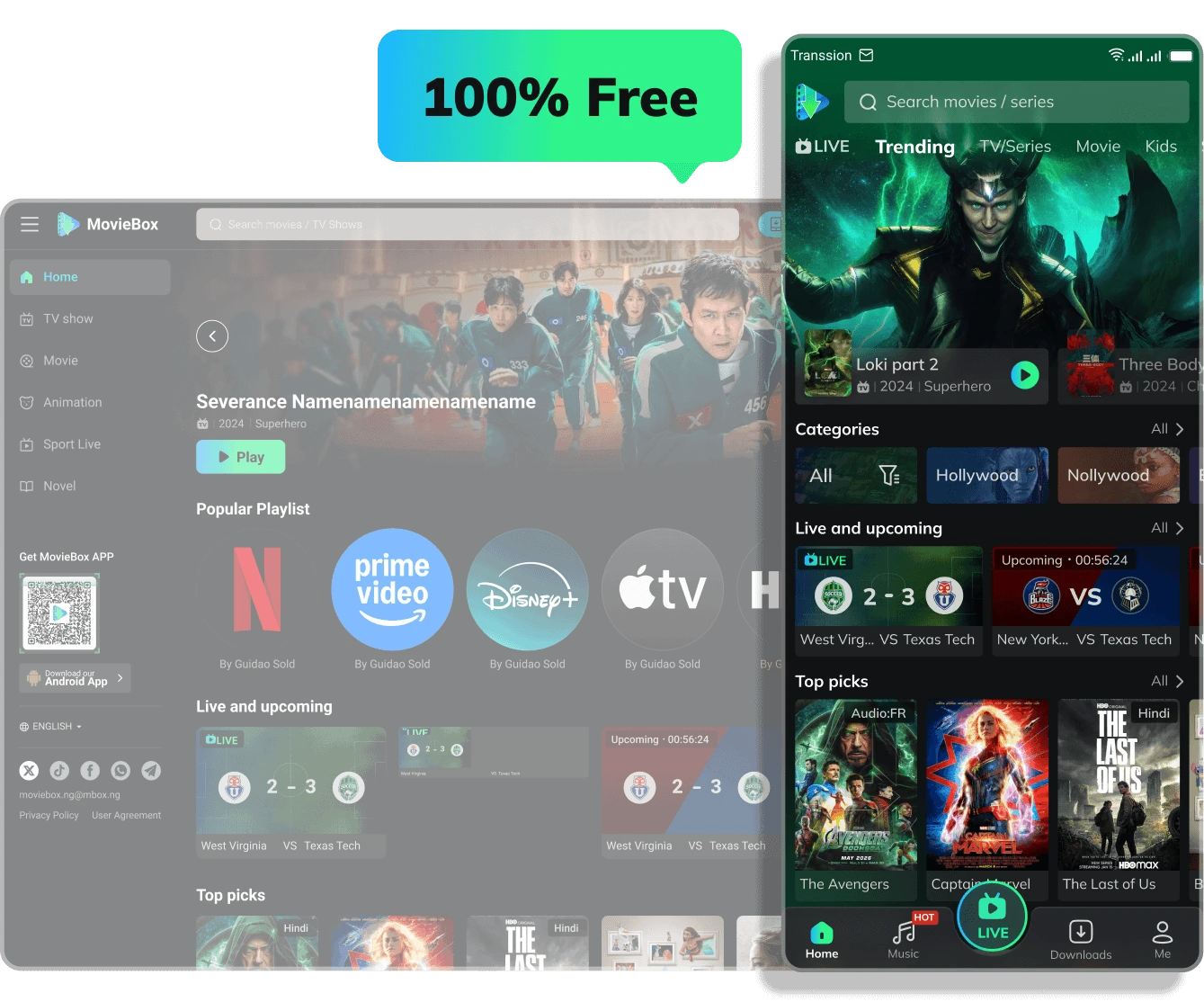
How to Download and Install MovieBox APK on Android
Because MovieBox is an independent third-party entertainment application, it is distributed directly via verified APK packages rather than the Google Play Store. Sideloading the official APK on any Android phone or tablet takes less than two minutes:
- 1Step 1: Download APK Package — Click the official download button on movieboxbd.in to save the verified 'moviebox_v11.5_latest.apk' package to your phone storage.
- 2Step 2: Enable Unknown Sources — Open your device Settings > Security (or Apps & Notifications > Special App Access). Locate 'Install Unknown Apps', select your browser or File Manager, and toggle 'Allow from this source' to ON.
- 3Step 3: Locate Downloaded File — Open your device Downloads folder using your preferred File Manager and locate the downloaded MovieBox installation file.
- 4Step 4: Confirm Installation — Tap on the APK file. When the security prompt appears showing permissions, tap 'Install' and wait a few seconds as the package unpacks.
- 5Step 5: Launch & Stream — Once installation concludes, tap 'Open'. Grant required storage permissions for offline caching, explore the trending movies section, and begin streaming immediately!
How to Install MovieBox on Amazon FireStick & Fire TV
Amazon Fire TV Stick and Fire TV Cube devices provide the ultimate cinema canvas for MovieBox. Follow this step-by-step sideloading walkthrough using the Downloader app:
- 1Step 1: Install Downloader App — On your FireStick home screen, navigate to Find > Search. Type 'Downloader', locate the orange Downloader icon from AFTVnews, and click Get / Download to install it.
- 2Step 2: Enable Developer Options — Go to FireStick Settings > My Fire TV > About. Highlight 'Fire TV Stick' and press the Center Select button on your remote 7 times consecutively until you see 'No need, you are already a developer'.
- 3Step 3: Allow Unknown Apps for Downloader — Press Back to return to Settings > My Fire TV > Developer Options. Click 'Install unknown apps' and toggle Downloader to 'ON'.
- 4Step 4: Enter Download URL — Open Downloader, grant storage permissions, and in the URL search box type: https://movieboxbd.in/download-apk/ (or enter the direct APK URL). Click 'Go'.
- 5Step 5: Install on Big Screen — When the download finishes, Downloader will display an installation dialog. Click 'Install', then click 'Done', and delete the temporary APK file to preserve FireStick flash memory.
- 6Step 6: Access MovieBox — Hold the Home button on your remote, select 'Apps', find MovieBox, move it to your front row, and enjoy unlimited streaming on your television!
How to Run MovieBox on Windows PC & Mac
While MovieBox is engineered natively for Android, you can enjoy it on Windows 10/11 desktops, laptops, and macOS computers with complete ease by using high-performance Android emulators such as BlueStacks, LDPlayer, or NoxPlayer:
- 1Step 1: Download a trusted emulator like BlueStacks 5 or LDPlayer 9 from their official website.
- 2Step 2: Complete emulator setup and open the virtual Android desktop screen.
- 3Step 3: Download the MovieBox APK file from movieboxbd.in directly onto your PC.
- 4Step 4: Drag and drop the downloaded 'moviebox_v11.5_latest.apk' into the active emulator window, or click the 'Install APK' button on the emulator sidebar.
- 5Step 5: The emulator will install MovieBox within seconds. Launch the app, switch to full-screen mode (F11), and enjoy high-resolution streaming on your computer monitor!
MovieBox APK vs Competitor Streaming Apps
How does MovieBox compare against other prominent entertainment applications like Cinema HD, BeeTV, and TeaTV? The comparison table below illustrates why MovieBox continues to lead the space in 2026:
| Feature / Metric | MovieBox APK | Cinema HD | BeeTV | TeaTV |
|---|---|---|---|---|
| Library Size | 60,000+ Movies & Series | 40,000+ Titles | 35,000+ Titles | 30,000+ Titles |
| 4K Ultra HD Support | Yes (High-Bitrate HEVC) | Partial | Yes | Limited |
| Ad Experience | Zero Intrusive Popups | Heavy Popups | Moderate Ads | Heavy Ads |
| FireStick Remote UI | 100% Native D-Pad | Partial | Optimized | Requires Mouse |
| Real-Debrid Support | Yes (Multi-Threaded) | Yes | Yes | Yes |
| Multi-Language Subtitles | Yes (30+ Languages Auto) | Limited English | Yes | Limited |
| Registration Required | Never Required | Never Required | Never Required | Optional |
| Download Speeds | Ultra-Fast Multi-Threaded | Moderate | Fast | Slow |
Comprehensive Device Compatibility Matrix for MovieBox
MovieBox is engineered with lightweight, optimized code that runs effortlessly across an extensive range of hardware specifications, from entry-level smartphones to flagship home theater displays:
| Device Category | Supported Operating System | Recommended Hardware | Optimization Status |
|---|---|---|---|
| Android Smartphones & Phablets | Android 5.0 through Android 15+ | 2 GB RAM / Quad-Core CPU | 100% Fully Optimized Touch UI |
| Amazon Fire TV Stick & Cube | Fire OS 5, 6, 7, 8 (All Generations) | 1.5 GB RAM / Fire TV Remote | Native Leanback Remote Navigation |
| Android TV & Google TV Displays | Android TV 9.0, 10, 11, 12, 13, 14 | 2 GB RAM / 4K UHD Decoder | 10-Foot Television Card Interface |
| Windows PC & Laptops | Windows 10 / Windows 11 (64-bit) | 4 GB RAM with Virtualization | Full-Screen Emulation (BlueStacks / LDPlayer) |
| Apple Mac Computers | macOS Monterey, Ventura, Sonoma, Sequoia | 8 GB Memory (Apple Silicon M1-M4 / Intel) | Flawless emulation via Android Virtual Environment |
Deep Dive: Supported Genres and Content Categories in MovieBox
MovieBox caters to a global audience with rich diversity in its catalog. The app organizes its content into intuitive hubs so you can easily discover titles suited to your taste:
• Hollywood Blockbusters & Premier Releases: Instant access to high-budget studio titles from Warner Bros, Universal, Paramount, Marvel, DC, and Sony Pictures in original English and dual-audio tracks.
• Bollywood & South Asian Hits: Explore an immense catalog of Hindi cinema, timeless 90s romances, high-octane action sagas, and regional South Indian cinema dubbed in Hindi.
• Korean Dramas (K-Dramas) & Asian Series: Access trending romantic comedies, time-travel fantasy dramas, and psychological mystery thrillers with synchronized subtitles.
• Japanese Anime & Animated Features: Extensive collections of classic and trending anime series with timely simulcast releases and dual-audio dubbed choices.
• 24/7 Live Sports Arena: Stream international cricket matches, ICC events, football leagues (Premier League, Champions League), combat sports (UFC, WWE), and motorsport tournaments.
Pro Tips: How to Eliminate Buffering and Optimize Playback Speed
If you experience slow loading or occasional buffering on slower internet connections, these verified optimizations will ensure butter-smooth playback:
- 11. Clear App Cache Regularly: Go to device Settings > Apps > MovieBox > Storage > Clear Cache. Clearing cached video fragments frees up device memory and eliminates sluggish navigation.
- 22. Connect to 5 GHz Wi-Fi: Standard 2.4 GHz Wi-Fi bands suffer from signal interference. Connect to a 5 GHz frequency for significantly higher streaming bandwidth.
- 33. Switch to Cloudflare or Google DNS: Configure your device DNS to Cloudflare (1.1.1.1) or Google DNS (8.8.8.8) to bypass restrictive ISP throttling and discover streams faster.
- 44. Switch Hardware vs Software Decoding: If you notice frame drops or black screens on older hardware, toggle video decoding from Hardware (HW) to Software (SW) inside player settings.
- 55. Select Alternate Streaming Mirrors: If Server 1 is heavily congested, tap the source icon to instantly pick Server 2 or Server 3 for faster throughput.
Safety, Antivirus Certification & Zero-Malware Guarantee
User security is our highest priority. The official MovieBox APK release hosted on movieboxbd.in is scanned continuously through VirusTotal across 70+ leading antivirus engines (including Kaspersky, Bitdefender, Symantec, and ESET). The package is 100% clean of trojans, spyware, adware, and malicious scripts. Furthermore, MovieBox requires zero invasive device permissions (no contact list, camera, or location access required).
Troubleshooting Common MovieBox Issues
Encountering an issue? Here are quick resolutions for the most frequent questions:
• 'App Not Installed' Error: Ensure you have uninstalled older conflicting versions of MovieBox and verify that your device has at least 500 MB of free internal storage.
• Streaming Links Not Loading: Verify your internet connection and toggle your Wi-Fi or router connection. Alternatively, enable a reputable VPN if your local provider restricts media hosters.
• Audio Out of Sync: Open the in-player audio settings and select 'Audio Sync Offset' to adjust delay in milliseconds, or switch audio output to stereo mode.
Frequently Asked Questions (FAQs)
Find quick answers to the most common queries regarding MovieBox APK below:
Final Thoughts & Recommendation
In a crowded world of fragmented streaming apps and costly monthly subscriptions, MovieBox APK v11.5 stands apart as a comprehensive, free, and powerhouse cinema application for all cord-cutters. Combining a massive 60,000+ title catalog, 4K picture quality, multi-language subtitles, and seamless multi-device compatibility across Android, FireStick, and PC, MovieBox delivers the ultimate cinema experience right to your screens. Download official MovieBox APK v11.5 today and upgrade your daily streaming entertainment!
Frequently Asked Questions (FAQs)
Find detailed answers to common questions about MovieBox APK:
Yes, MovieBox is 100% free forever. You will never be required to pay subscriptions, purchase tokens, or enter credit card details to stream movies, web series, or live sports.